Choosing accounting software for a non-governmental organization (NGO) is an important financial decision. The right system should do more than record receipts and payments. It should help the organization maintain reliable accounts, monitor project expenditure, manage financial approvals and prepare information for management, donors and auditors.
For NGOs in Pakistan, the decision can be particularly challenging. Organizations may operate several projects simultaneously, receive funding from different sources, work across multiple locations and have limited finance staff. A system that works well for a small commercial business may not meet all these requirements.
Before investing in new software, it is worth evaluating the following areas.
- Start With Your Organization's Accounting Requirements
Not every NGO needs the same accounting system. A small community organization may require straightforward bookkeeping and financial statements, while a larger development organization may need project-level reporting, multiple approval stages and detailed expenditure analysis.
Before arranging a software demonstration, identify your organization's requirements.
Consider the following questions:
How many projects does the organization manage?
Does it receive funding from multiple donors?
Does management require separate financial reports for individual projects?
Are budgets prepared annually, monthly or by project activity?
Does the organization operate from one office or several locations?
Who can record transactions, approve payments and review financial reports?
How are financial records currently maintained and checked?
These questions establish a practical basis for comparing software rather than selecting a system simply because it has an impressive list of features.
- Check Whether Every Transaction Can Be Traced
Reliable accounting depends on the ability to move from a summary figure to the underlying transaction.
For example, management may want to understand why a particular project has incurred PKR 250,000 in expenditure. The finance team should be able to examine the relevant ledger accounts, individual transactions and supporting documentation.
During a demonstration, ask the software provider to show how you can move from:
A financial statement or project summary.
The relevant general ledger account.
An individual receipt, payment or journal entry.
The available supporting documents and transaction details.
Also check whether the system supports appropriate transaction references, consistent account coding and a clear record of changes where required.
This is particularly important when financial information must be reviewed by management or external auditors.
- Evaluate How the Software Handles Multiple Projects
An NGO's consolidated financial statements provide an overall view of its finances, but they do not always explain how individual projects are performing.
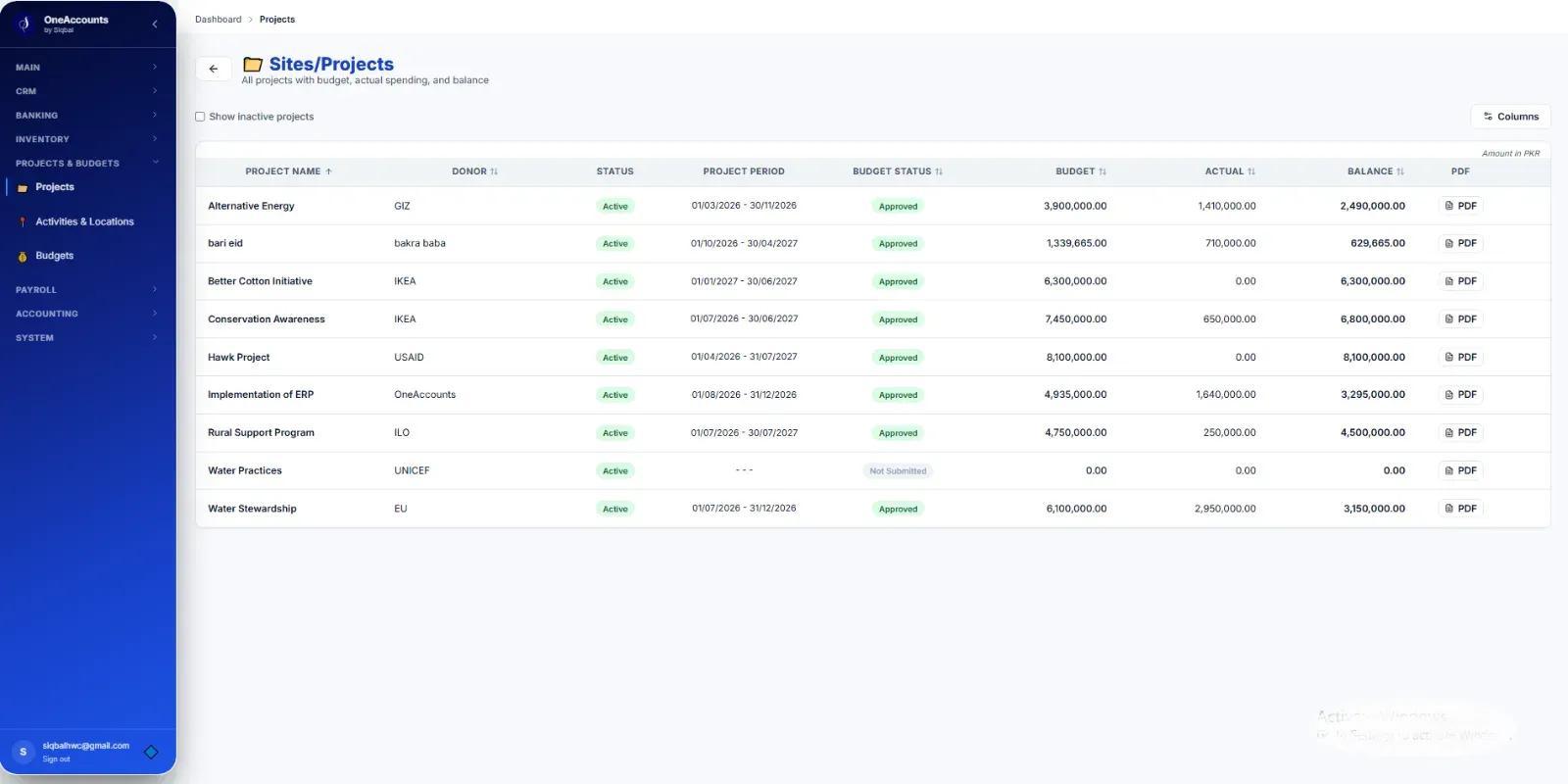
Suppose an organization is implementing three programs: education, healthcare and community development. Management may need to know the expenditure incurred under each program without preparing separate spreadsheets every month.
Ask whether the software can:
Record transactions against the appropriate project.
Organize projects into activities or other relevant categories.
Report income and expenses for each project.
Consolidate project results into organization-wide financial statements.
Filter reports by project, period and account where supported.
A useful system should reduce the need to maintain parallel accounting records for every project.
However, project tracking and full fund accounting are not necessarily the same thing. If your organization manages restricted funding, confirm how the software records and monitors donor-specific restrictions and whether it provides the controls your funding agreements require.
- Understand the Difference Between Recording and Approving Transactions
Recording a payment and authorizing a payment are two different activities.
An NGO may have policies requiring a project manager to verify an expense, a finance officer to check its accounting treatment and an authorized person to approve the payment.
Ask the software provider to demonstrate the actual approval workflow.
Important questions include:
Can different users have different permissions?
Can approval responsibilities be assigned according to organizational policy?
Can the system prevent unauthorized users from performing restricted actions?
Can users identify which transactions are awaiting approval?
Are approval records and relevant changes retained for review?
Not every organization needs a complicated approval structure. The objective is to ensure that the software supports the organization's approved financial procedures.
Do not assume that a system offers automated multi-level approvals simply because it provides user accounts or role-based access.
- Examine Procurement and Expense Controls
Procurement is another area where financial records and operational procedures need to work together.
For example, an NGO may approve a purchase request, obtain quotations, issue a purchase order, receive goods or services and subsequently process a supplier invoice and payment.
If these steps are managed in disconnected files, it can become difficult to verify whether expenditure followed the organization's procurement policy.
When evaluating NGO accounting software, ask whether it supports the stages your organization actually uses.
Check whether it can maintain purchase records, associate transactions with the relevant project, document approvals and provide a traceable link between purchasing activity and accounting entries.
If purchase orders and procurement approvals are important to your organization, request a live demonstration of those features. If they require a separate module, additional configuration or another system, establish this before making a decision.
- Look Beyond the Financial Statements
Every accounting system should be evaluated for its ability to produce accurate financial statements. NGOs may also require management reports that answer more specific operational questions.
Examples include:
How much has each project spent during the current reporting period?
Which expense categories account for the largest share of expenditure?
Which transactions have been recorded but still require approval?
What are the outstanding balances of customers, suppliers or other relevant accounts?
Can management review expenditure by project, activity or location?
Can reports be exported for further analysis or presentation?
Ask the provider to generate these reports using sample data during the demonstration.
A report that looks attractive on a presentation slide is not sufficient. Check whether the figures can be traced back to the accounting records and whether the report can be generated for the periods and categories your organization needs.
- Review Security and User Access
NGOs may maintain sensitive financial information, employee records, donor details and project documentation. Access should therefore be controlled according to each user's responsibilities.
During your evaluation, ask about:
Role-based access permissions.
Separation of responsibilities between accounting and approval functions.
Protection of data during transmission and storage.
Backup and recovery procedures.
Audit logs and transaction history.
Access removal when an employee leaves the organization.
Data ownership and the process for exporting records if you change providers.
For cloud software, also clarify what is included in the subscription, how backups are managed and what recovery arrangements are available.
Ask for specific explanations of the security controls rather than relying solely on statements such as “fully secure” or “100% protected.”
- Consider the Practicalities of Implementation
Even capable accounting software can create difficulties if the implementation process is poorly planned.
Before migrating from spreadsheets or an existing accounting application, discuss the following matters with the provider.
Chart of accounts: Can the organization's existing account structure be mapped to the new system?
Opening balances: How will bank balances, receivables, payables and other opening figures be transferred and reconciled?
Historical transactions: Does the organization need full historical records or only selected periods?
Project information: How will existing project codes, activities and relevant budget information be transferred?
Staff training: Who will train finance staff and other authorized users?
Testing: Will the organization verify opening balances, transaction postings and financial reports before relying on the new system?
A successful implementation should include reconciliation and testing, not simply uploading a spreadsheet and assuming that all information has transferred correctly.
Ask which implementation activities are included in the quoted price and which may involve additional charges.
- Compare the Total Cost, Not Just the Subscription
The lowest advertised subscription is not necessarily the most economical choice.
When comparing accounting systems, consider the complete cost of using the software.
This may include:
Monthly or annual subscription fees.
Additional users or organizational entities.
Implementation and data migration.
Staff training.
Additional modules and integrations.
Ongoing support and maintenance.
Data export and transition arrangements.
Also consider the cost of the current process. If finance staff spend substantial time preparing reports manually, reconciling separate spreadsheets and correcting inconsistent records, these activities have an operational cost.
The objective is not to purchase the most expensive system. It is to find a system that meets your requirements at a reasonable and sustainable cost.
- Ask for a Demonstration Based on Real NGO Scenarios
A generic product presentation may not reveal whether the software suits your organization.
Prepare a few realistic scenarios before attending a demonstration.
For example:
Scenario A: Recording a project expense
Record a supplier payment, allocate it to the appropriate expense account and project, and show how the transaction appears in the ledger and project report.
Scenario B: Reviewing a project's financial position
Generate an income and expenditure report for a selected project and reconcile a sample figure with its underlying transactions.
Scenario C: Checking financial authorization
Demonstrate how the organization records, reviews and approves a transaction according to its actual approval policy.
Scenario D: Producing management information
Generate a financial statement and export the relevant figures for further review.
Scenario E: Reviewing access permissions
Show what an ordinary accounting user can do compared with a user responsible for reviewing or authorizing transactions.
Ask the provider to perform these tasks in the actual application rather than showing only screenshots or a prepared presentation.
NGO Accounting Software Evaluation Checklist
Use this checklist when comparing two or more software providers.
Evaluation area
What to verify
Accounting
General ledger, chart of accounts and accurate financial statements
Project tracking
Project-wise income, expenditure and reporting
Fund management
Handling of donor funding and applicable restrictions
Budget controls
Approved budgets, expenditure monitoring and variance reports
Approvals
Permissions and workflows aligned with organizational policy
Procurement
Purchase records and traceability of relevant expenditure
Reporting
Detailed transactions, financial statements and export options
Security
Access controls, backups, recovery and transaction history
Implementation
Data migration, opening balances, testing and training
Cost
Subscription, implementation, support and additional modules
Not every requirement will have equal importance for every NGO. Mark each item as essential, desirable or unnecessary for your organization before comparing providers.
Why the Right Accounting System Matters
The purpose of accounting software is not simply to replace manual bookkeeping. It is to help an organization maintain consistent financial records, make informed decisions and demonstrate how its financial resources have been managed.
The right system should make it easier to trace transactions, review project performance, apply appropriate financial controls and prepare reliable information for management and other stakeholders.
For NGOs in Pakistan, a practical evaluation should balance accounting requirements, project operations, internal controls, implementation effort and long-term affordability.
Explore OneAccounts by Siqbal
OneAccounts by Siqbal provides accounting and ERP software for NGOs, trading businesses and service organizations. Its NGO-focused capabilities include accounting, project-related financial tracking, budgeting and financial reporting.
Organizations evaluating the software can review its available features against their own operational requirements and determine whether it is suitable for their accounting processes.
Before making a decision, request a demonstration of the specific workflows your organization needs, including project reporting, budget controls, transaction traceability and any required approval procedures.
Learn more: OneAccounts by Siqbal
Explore the NGO accounting solution: NGO Accounting Software
Simple by Design. Professional by Nature.
A weighted scorecard to compare vendors
Feature lists do not decide a purchase; demonstrated behaviour does. Score each vendor from 0 to 5 on what you actually saw them do with your own scenarios, then weight the scores by what matters to your NGO. A starting point, which you should adjust:
| Area | Example weight |
|---|---|
| Core accounting (ledger, journals, trial balance, statements) | 20% |
| Donor, project, activity and location tracking | 20% |
| Budget control and approvals | 15% |
| Reports donors and auditors ask for | 15% |
| Controls and security (roles, audit log, locked periods) | 10% |
| Implementation, training and support | 10% |
| Total cost | 10% |
Multiply each score by its weight and add them up. If two vendors are close, give more weight to the area that has hurt you most in the past.
Cloud or desktop?
Cloud software is reached through a browser, so several offices and staff can work on the same records, and updates and backups are handled for you. Desktop software keeps data on one computer, which can suit a single office but makes access from other locations and recovery after a failure harder. Ask where the data is stored, who can see it and how it is backed up.
Count the total cost, not just the subscription
Add up the subscription for every user, any add-on modules you will need (payroll, tax, fixed assets), setup and data migration, training, support, and the staff time to learn it. A cheap subscription with expensive set-up can cost more than a fuller package.